I use Heartbeat for my course and want to replace Vimeo with Gumlet.
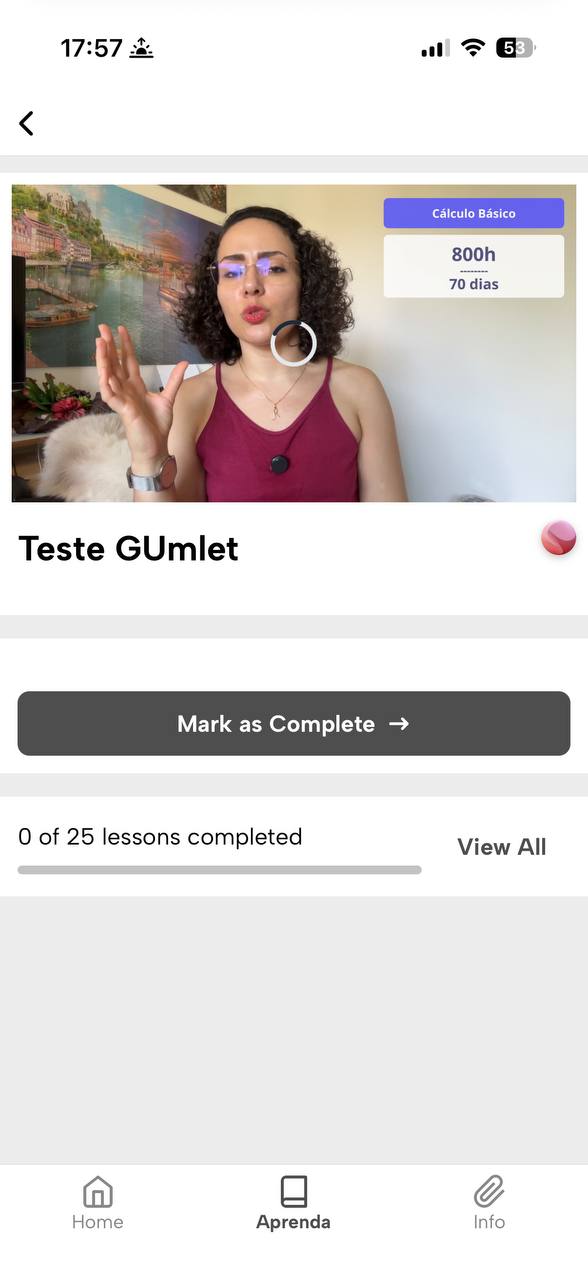
Today I did some tests and on the web version on the computer it worked correctly with the embed link, but when trying to access the same video through the IOS mobile app, it is not possible to play the video and it loads endlessly.
I really liked Gumlet and intend to subscribe to the service, but it is vital for me that the player works properly on Heartbeat.chat.
I contacted Heartbeat Chat support, and they told me: “We can only provide limited support for display issues with external embeds, since we don’t control the content inside that window.”
In the image below, it is possible to see how the player behaves in the Heartbeat.chat iOS app
Akbansa, I saw that the access I created for you did not allow access to the video hosted on Gumlet, but I have already fixed this. By accessing again, you will have access to the test lesson with the Gumlet video.
Thanks for the suggestion to add playsinline=0. We ran several additional tests, but unfortunately the issue still persists in the Heartbeat iOS app.
What we tested:
Using the Gumlet watch/share URL with playsinline=0.
Using the Gumlet embed URL (play.gumlet.io/embed/...) with:
playsinline=0
playsinline=1
Testing the embed with our usual parameters (background/autoplay/loop/controls) and also with no extra parameters at all.
Simplifying the iframe permissions/attributes (minimal “allow” settings, etc.) and trying a very basic iframe embed.
Result (consistent across all variants):
In the Heartbeat iOS app lesson the player shows the thumbnail, but gets stuck with an infinite loading spinner and never starts playback.
The same embed link plays correctly in iPhone Safari.
Heartbeat support already has an open ticket on this for about a month and is investigating. We contacted you in parallel in case there are Gumlet-specific workarounds for iOS in-app WebViews.
Do you have any further recommendations for embedding in iOS WKWebView / in-app browsers (e.g., specific player settings, required headers/referrer settings, known limitations, or an alternative integration approach such as direct HLS playback with a native video tag)?
We know that setting WKWebViewConfiguration Object with `allowsInlineMediaPlayback` property set to true makes it work. Does it help? We are trying on our own to make this work even without it. We will get back in a few days.